Grounded review prep
Move through the spec book faster while the exact page stays close enough for a reviewer to check the work.
 Book a fit call
Anyone can generate a log. A reviewer asks where each row came from. SubPro keeps source checks and human review in the workflow: every drafted row carries its spec page, open questions are flagged, and nothing goes out until a person says so.
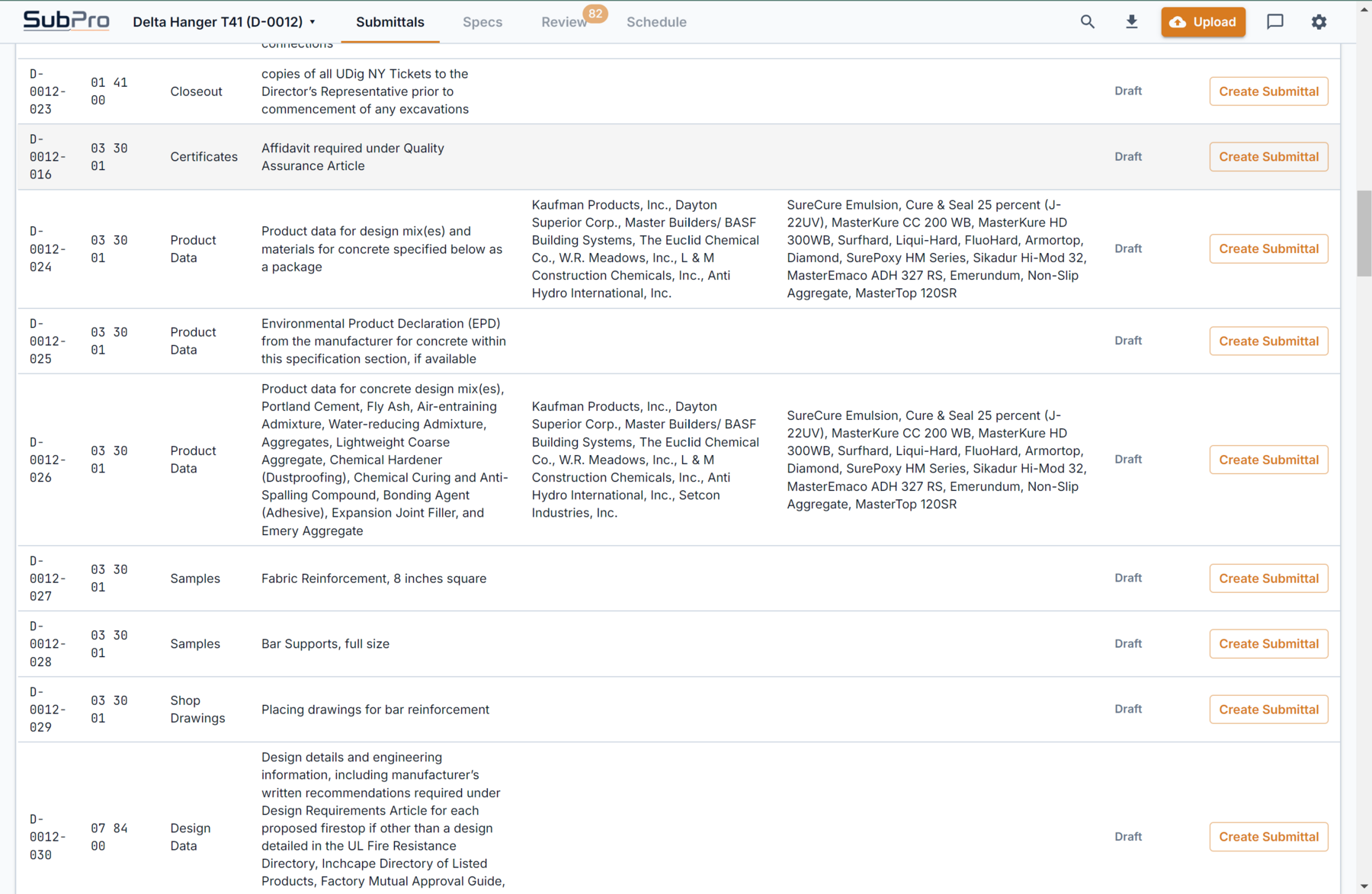
Move through the spec book faster while the exact page stays close enough for a reviewer to check the work.
Rows, flags, and submittal packages sit in the open before your team sends anything onward.
Pilots confirm scope and handling terms before real work begins. The public site chat takes no files.
The useful version of this software is narrow on purpose. SubPro reads the specification sections and drafts the first-pass rows with the source page attached to each one. It is not asked to approve a submittal, judge a substitution, or decide conformance. Those are human calls, and they stay human.
That boundary is what makes the output trustworthy. Because every row keeps its source reference, a reviewer confirms the basis in a click, and the flags point at the rows that most need a look. Perfect extraction is not promised. A fast, checkable first pass is.
Section 26 51 00 Interior Lighting: product data for luminaires, drivers, and controls becomes draft rows, each linked to the page it came from.
Where a fixture allows an equal or a substitution, the row is flagged for a decision rather than assumed.
A PE or PM opens the source page, confirms the requirement, and corrects anything the draft got wrong.
Only after that review do the 26 51 00 rows move into the export. Nothing approves itself.
| The work | Manual prep | General chatbot | SubPro |
|---|---|---|---|
| Reading the spec book | Weeks of page-turning, section by section | Reads what you paste, loses the page numbers | Reads every division and keeps the page behind each row |
| Evidence behind a row | Whatever the coordinator remembered to note | Prose, not citations | One click from any row to its page |
| Rows the tool was unsure about | Invisible until a reviewer catches them | Stated as flatly as everything else | Flagged for a person, never assumed |
| Supporting documents | Hunted down one manufacturer site at a time | Links that may not resolve | Matched from a maintained library |
| The final call | Human | Unclear | Human, every time, by design |
Product data, safety data sheets, and installation guides, collected from manufacturer sources and searchable in the document library.
Indexed with their divisions and products in the manufacturer library, so a drafted row points at real paperwork.
Library entries keep their source, and takedown requests are honored through the published document rights process.
It reads the project manual section by section, finds each submittals article, and drafts a row per required item with the source page attached. The reading is fast. The final call is not delegated: review flags and a person's approval stay in the workflow.
No. SubPro prepares review-ready output, not finished submittals. Your team verifies requirements, ownership, substitutions, conformance, and the final submittal package decisions. Perfect extraction is not promised, which is why the page behind every row stays visible.
No. The project manual is processed for the job, then deleted, and is never used for training. Data handling terms are confirmed before any real project work begins.
No. Project PDFs and files cannot be sent through the public website chat. Real project work happens after a pilot fit call where data handling is confirmed in writing.
The drafting engine: spec sections in, cited log rows out.
Registers where every row keeps its page number.
The whole build, from spec book to bound submittal package PDFs.
One project manual, one drafted log, and a citation to click on every row. The Log Build ships either the drafted log with its flags or every row read by a person first.