General contractors
Turn one project manual into a cleaner starting log before anyone chases responsible parties and dates.
 Book a fit call
Every submittal dispute ends with someone producing the record. SubPro builds the cited log and the submittal packages, then keeps statuses, revisions, and transmittals moving, so closeout opens on a record instead of a reconstruction.
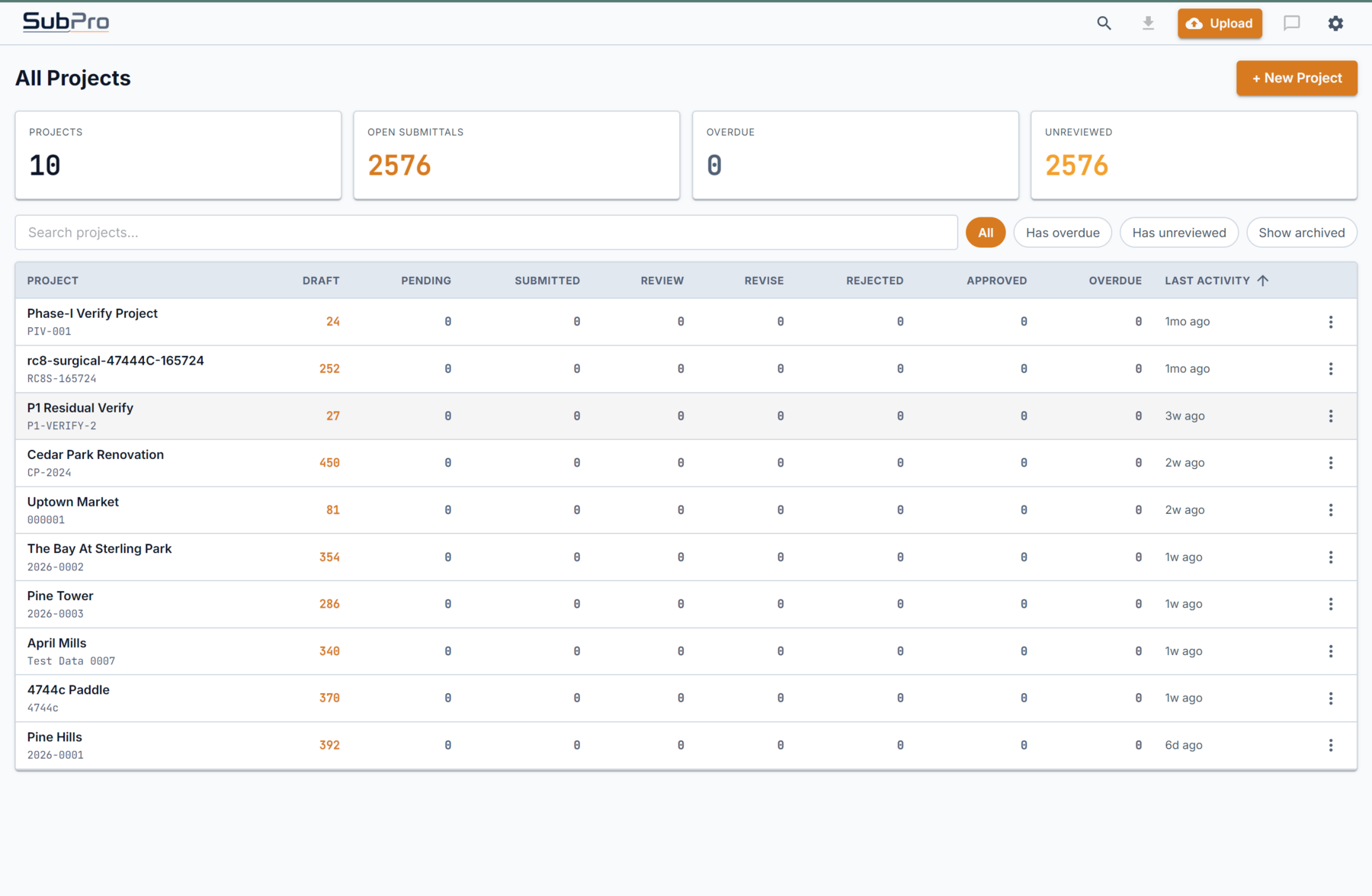
Turn one project manual into a cleaner starting log before anyone chases responsible parties and dates.
Spot the major submittal obligations early and hand operations a log instead of a blank tracker.
Page references, review notes, and matched product data stay on the row, so the next reviewer is not starting over.
Whoever inherits the last month inherits final statuses, stacked revisions, and transmittal dates on file.
A construction submittal lives a long life: defined in the project manual, logged, assembled, reviewed, revised, sent, returned. Most software picks one slice of that life, and every handoff between tools is a chance for the record to lie.
SubPro removes the handoffs instead of refereeing them. The log is born cited. Submittal packages attach to their rows instead of a folder named FINAL_v3. When a question needs the manual rather than the log, the built-in chat answers with the page it lives on.

Week one: a color-coded tracking spreadsheet, current. Month three: the PE who owned it moved jobs and four rows say "see email." Then closeout asks whether the fire-stopping product data was approved, and answering from a dead spreadsheet is a two-week archaeology project.
The record dies because keeping it alive was somebody's second job. The fix is a record that updates because the work went through it.
Eighteen months after substantial completion a cabinet door delaminates, and the owner's rep asks whether the installed product matched the approved submittal. The row shows the approved revision, the transmittal that carried it, and the spec page that required it.
SubPro is not a closeout binder generator, and the approval judgment stays with your PM, PE, and the design team. The record simply exists, cited and dated, when someone closes the job out.
Rows for air handlers, pumps, and terminal units in Division 23 Mechanical, HVAC, each tied to its source page.
A row for mechanical coordination drawings, flagged where three trades will argue over who owed them.
Building controls and sequence-of-operations rows kept distinct, so each is reviewed on its own.
The reviewed Division 23 set exports as a cited register for your approval workflow.
Section 10 44 00 Fire Protection Specialties is a dozen rows of extinguishers and cabinets that still generate paperwork for a year. The product data and cabinet shop drawings are born cited. The architect kicks back the cabinet finish, and the first submission stays in the row's history under the revision. The resubmission goes out under a dated transmittal, and two years later the fire marshal's question takes one click.

"The GC makes us use their portal anyway." Then use it. SubPro is where your side gets done: the cited log, the assembled submittal packages, your statuses and history. The exports drop into whatever the GC runs, and your record outlives their portal access.
"We do not need another system to update." Agreed. Status moves because a reviewer clicked approve. History exists because a revision was uploaded.
"Software reading our spec book makes people nervous." Every extracted row carries the page it came from, and the project manual is deleted after the run, never retained, never used for training. The data handling page has the detail.
"We are too small for this." Small teams have it worst: a nine-person specialty contractor has a PM doing submittals at night. Pilots start with one project manual for that reason.
Over 11,000 manufacturer documents in the open library: product data, safety data sheets, installation guides.
Over 800 manufacturers cataloged by division in the manufacturer index.
Every entry keeps its origin, and the document rights process stands behind it.

The whole span. It reads the project manual and drafts the cited log, assembles the submittal packages, then keeps statuses, revisions, and transmittals current until closeout opens on a complete record.
Only if a GC requires one. SubPro tracks the submittals it builds: status, revision history, and the transmittal record per item. Where a mandated portal exists, the XLSX and PDF exports drop your record in without a retyping project.
It keeps the record for both. Your PM, PE, and design professionals still make the calls. SubPro contributes the paper trail those calls sit on: what was submitted, revised, sent, and returned, ready when closeout asks.
Yes. Run the project manual whenever you arrive. The cited draft becomes a baseline to reconcile against whatever log exists, which is usually the fastest audit that log has ever had.
A closer look at the log itself: columns, citations, and edits.
The register view of the same record, evidence attached to each line.
What gets read, what gets flagged, and where people decide.
Before status and closeout comes a first draft. One project manual from a live job is enough to see the record take shape.