Submittal software
What SubPro reads, and why each row is set up for a person to check.
 Book a fit call
When your PM opens a row in SubPro, the requirement, the page it came from and the matched product data are all right there, along with any flag. Then they make the call.
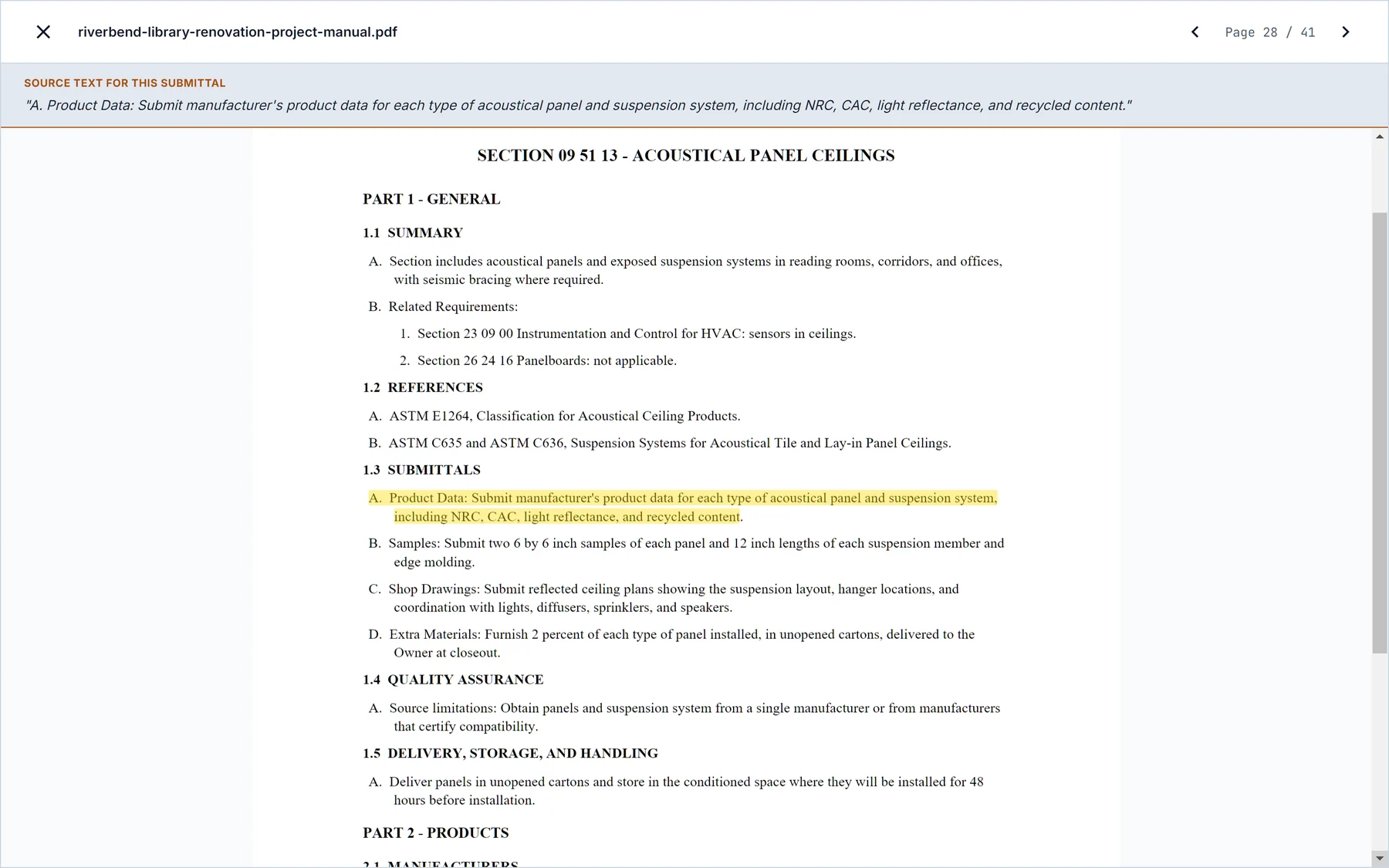
Thermal insulation is a short section, but it has four kinds of submittal in it. Here's what the reviewer sees on each row and the call they have to make.
| Row in the log | What the reviewer sees | The call |
|---|---|---|
| Product data, board insulation | The paragraph in Section 07 21 00 that requires it, quoted with its page, and the matched data sheet. | Confirm the product matches the specified R-value and facing. Move it to Ready to send. |
| Substitution, where an equal is allowed | A flag on the row, because the spec section permits an or equal and someone has to choose. | Pick the product or keep the basis of design. The reviewer makes that choice. |
| Fire test and R-value reports | Test report rows with their source paragraphs, so they don't get lost in the product data. | Check the report covers the assembly the drawings show. Leave it in Draft with a note if it does not. |
| Mockup, if the section calls for one | Ask the chat in SubPro and it comes back with the page, so you know whether the section asks for one. | Add the row or close the question, and the page stays on record either way. |

Submittal review is where the PE or PM decides if the log is right. Is the requirement real, is it on the right party, does it need a substitution, is the product data good enough. On most jobs that means going back and forth between a spreadsheet, the project manual PDF and a folder of cut sheets for every single row.
In SubPro each row shows its spec page and its matched product data in the same view, so the reviewer can check it without leaving the row. When the question goes beyond that row, you can ask the chat in SubPro and it pulls the page from the project manual and tells you where it is. The decision is still yours.
You still need a reviewer. SubPro drafts the log and points out the decisions, and your team checks scope, products and timing and makes the final call. If you want to see the review pass on your own document first, book a fit call and send one project manual. The drafted rows come with a report of which lines need your attention.


What SubPro reads, and why each row is set up for a person to check.
What a submittal log is, what a row is and what it tracks.
What happens once a row is Ready to send. It gets a cover sheet, a PDF and a dated record of when it went out.
It puts each draft row next to its spec page, its matched product data and any flag. The reviewer confirms the requirement, decides on the flag and moves the row to Ready to send or leaves it in Draft, and doesn't have to reopen the project manual to do it.
A flag marks a row that needs a person. That's a row SubPro isn't confident about, a row with no page reference, a product the book doesn't name, or a row that's new in a revision. Flagged rows stand out in the log so the reviewer clears them before they move to Ready to send.
Yes. The chat in SubPro answers from the project documents and gives you the page. If you want to know whether Section 07 21 00 calls for a mockup, you ask, read the page it gives you and decide on the row.
No. Ready to send means your reviewer is happy the row matches the project manual and the submittal package behind it is complete. The architect's stamp, whether it's No Exceptions Taken or Revise and Resubmit, still comes from the design team.
Book a fit call and send a project manual from a live job. Your reviewer reads the drafted log, starting with the flags, and you decide from there.